

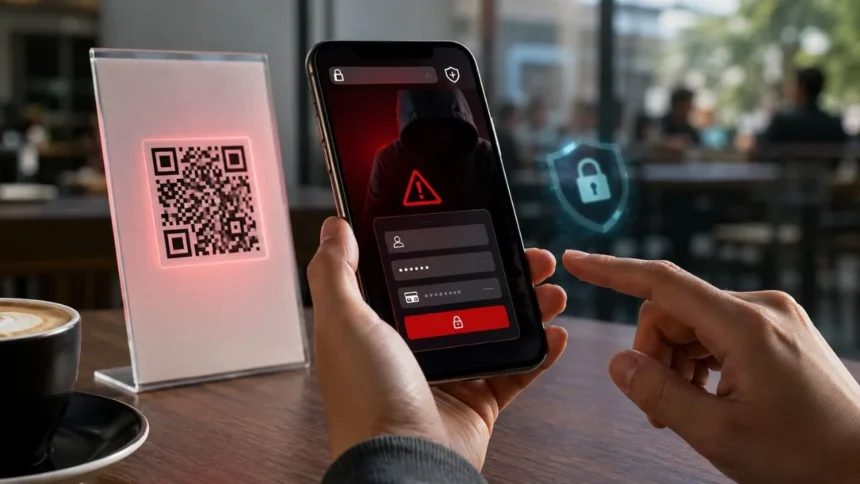
What Is Quishing? QR Code Scam Risks & Prevention
Quishing is a form of phishing that uses a QR code to direct someone towards a fraudulent website, malicious download or deceptive payment request. The name combines “QR code” and phishing, reflecting how attackers hide a harmful destination inside an image that looks convenient and familiar.
A malicious QR code may appear in an email, text message, parcel, parking notice, restaurant menu or poster. Once scanned, it can open a fake login page designed to steal passwords, payment information or personal details. Some attacks may also encourage users to install an unsafe application or approve an unauthorised sign-in.
Quishing works because people cannot read a QR code’s destination simply by looking at the black-and-white pattern. They may therefore scan it without applying the caution they would use with a visible web link. The transition from a computer screen to a mobile phone can also bypass some workplace security controls.
QR codes themselves are not dangerous, and most legitimate codes are safe when they come from a trusted source. The risk comes from the information or link encoded inside them. Learning to pause, preview and verify before opening a destination can prevent many QR code scams.
What Does Quishing Mean?
Quishing means using a QR code as the delivery method for a phishing attack. Traditional phishing commonly asks someone to click a link in an email or text, while quishing hides that same type of link behind a scannable graphic. The attacker’s goal is usually to create trust, urgency or curiosity.
The QR code may lead to a website that copies a bank, delivery company, government department or workplace sign-in page. A victim who enters information may unknowingly send it directly to the scammer. The copied site may then display an error or redirect to the genuine service to reduce suspicion.
Some quishing attacks focus on financial theft instead of login details. The code may open a false payment page, cryptocurrency wallet or fraudulent invoice. Scammers frequently combine the code with warnings about overdue bills, parking penalties, account suspension or missed deliveries.
Other attacks attempt to connect an attacker-controlled device to an online account. A victim may be told to scan a code for account verification, multi-factor authentication or messaging-app access. Approving the request can give the attacker access without requiring a traditional password.
How Does a Quishing Attack Work?
A quishing attack begins when a criminal creates a QR code containing a malicious or deceptive destination. Creating the image requires little technical skill because ordinary QR code generators are widely available. The attacker then places the code inside a message, document, label or physical location.
The surrounding message gives the victim a reason to scan it. It may claim that a password is expiring, a payment has failed or an important document is waiting. Urgent wording reduces the likelihood that the person will stop and verify whether the request is genuine.
After scanning, the phone normally displays a preview of the destination or asks whether the user wants to open it. If the person continues, the browser loads the attacker’s page. A convincing logo, familiar colours and a realistic domain can make the page appear legitimate.
The final step depends on the campaign’s purpose. The page may collect credentials, request card details, initiate a payment or prompt an application download. Attackers may use the stolen information immediately or sell it to other criminals for later fraud.
Why QR Code Phishing Can Be Convincing
QR codes are associated with ordinary activities such as viewing menus, joining wireless networks and confirming event tickets. This familiarity can lower a person’s suspicion, particularly when the code appears in a professional-looking email or on an official-style notice. Convenience can unintentionally replace careful checking.
A QR image also hides the full destination from immediate view. A visible phishing link may contain misspellings or an unfamiliar domain, but a code offers no such clue until it is scanned. Some phones display only part of a long address, making careful inspection more difficult.
Quishing often moves the interaction from a protected workplace computer to a personal mobile device. The phone may not use the same email filtering, web protection or endpoint monitoring as the company network. Employees may also be less cautious when a request continues on a familiar personal device.
Mobile screens make fake websites harder to inspect because the address bar is smaller and page elements are condensed. A copied sign-in form can therefore look convincing at a quick glance. Password autofill may provide some protection when it refuses to recognise an imitation domain.
Quishing vs Traditional Phishing
Traditional phishing usually places a clickable link directly inside an email, text message or social media post. Email-security tools can analyse the displayed address, domain reputation and message content. Users may also recognise an unusual link before clicking it.
Quishing replaces the visible link with a QR code image. Some older security systems may treat the image as ordinary content rather than decoding and analysing its destination. This can allow the message to reach an inbox even when a standard phishing link would have been blocked.
Both methods rely heavily on social engineering. They impersonate trusted organisations, create urgency and ask the victim to take an action that benefits the attacker. The main difference is how the harmful destination is presented and opened.
A scam may also combine both techniques. An email can contain a QR code, a telephone number and instructions to contact supposed support staff. Multiple communication channels can make the request appear more credible while moving the victim beyond automated security checks.
Common Types of Quishing Scams
Fake account alerts are among the most common forms of QR code phishing. The message may claim that a Microsoft, Google, banking or company account requires immediate verification. The code then leads to a counterfeit login page that records the username and password.
Delivery and parcel scams use missed-delivery notices, unexpected packages or tracking updates. A victim may be asked to scan a code to identify a sender, reschedule delivery or pay a small fee. The resulting page can collect card information or other personal details.
Payment scams often appear around parking meters, restaurants, utility bills and invoices. A criminal may cover a genuine code with a fraudulent sticker or include one in a fake payment notice. The victim believes money is going to a legitimate organisation when it is being sent elsewhere.
Security and authentication scams instruct users to scan a code to activate multi-factor authentication or prevent an account from being closed. The process may authorise an attacker-controlled session or capture credentials. Genuine security language is used to persuade the victim to weaken their own protection.
Email-Based QR Code Phishing
An email-based quishing message often looks like an ordinary company notification. It may imitate a human resources department, cloud storage platform, cybersecurity team or senior employee. The QR code is usually presented as the quickest way to review a document or solve a supposed problem.
Attackers may personalise messages with the recipient’s name, employer or job title. Public websites and professional networks can provide enough information to make the email appear targeted. Familiar details do not prove that a request came from a legitimate sender.
The message may claim that the QR code is more secure than a normal link. It might mention encrypted documents, protected voicemail or mandatory account verification. This language discourages the recipient from questioning why a reputable organisation is asking them to scan an unexpected image.
Employees should verify unusual requests through a separate trusted channel. Instead of replying to the message, they can contact the supposed sender using an existing directory or official telephone number. Internal security teams should make suspicious-message reporting simple and clearly understood.
Physical QR Code Scams
Physical quishing occurs when a malicious QR code is placed on an object or in a public location. Common examples include stickers attached to parking meters, payment terminals, posters and restaurant tables. The fraudulent label may be positioned directly over a genuine code.
A replaced code can be difficult to recognise because the surrounding sign or machine is legitimate. The victim may trust the location rather than the actual destination. Criminals benefit from the assumption that a code displayed in a public facility has been approved by its operator.
Check whether the code appears to be an additional sticker, has damaged edges or covers another label. Signs of tampering should be reported to the organisation responsible for the location. When possible, use the official application or manually enter the service’s known website instead.
Businesses that display public QR codes should inspect them regularly. Tamper-resistant materials, clear branding and printed destination information can help customers verify what they are scanning. Staff should know how to remove fraudulent stickers and report suspected interference quickly.
Fake QR Code Payment Scams
A QR payment scam directs the victim to a fraudulent checkout page, bank-transfer request or digital wallet. It may involve a small initial payment because people are less likely to investigate a modest parking or delivery charge. The payment form can also capture card details for larger future fraud.
Scammers may send false invoices containing QR codes that supposedly simplify payment. A compromised business email account can make the request appear to come from a known supplier. Changing only the payment destination allows the rest of the invoice to look familiar.
Before paying, confirm the recipient name, amount and website domain. Do not rely only on logos or company colours because these are easy to copy. A payment page that requests unusual information or creates extreme urgency should be treated with suspicion.
Businesses should establish verification procedures for changed payment instructions. Employees should confirm new bank details through a known contact rather than the information provided in the message. Dual approval can reduce the chance that one rushed decision results in a major financial loss.
How Quishing Steals Login Credentials
A credential-stealing QR code usually opens a fake sign-in page that copies a popular email, banking or cloud platform. The user enters a username and password, believing the session is genuine. The attacker receives the information in real time.
More advanced pages may also request a one-time verification code. The attacker can use the stolen password on the real service and immediately ask the victim for the code generated by multi-factor authentication. This allows some forms of account protection to be bypassed.
A fake page may report that the password was incorrect even after recording it. The victim may enter the same credentials repeatedly or try another password. This can provide the criminal with several account combinations and increase the potential damage.
Password managers can help because they normally fill credentials only on the exact saved domain. If autofill does not appear on a familiar-looking page, stop and inspect the address. Manually opening the official application or saved bookmark is safer than continuing through the QR destination.
Can a QR Code Install Malware?
Scanning a QR code usually displays information or opens a destination rather than automatically infecting a device. The greater risk begins when the user opens the link, downloads a file or approves an installation. Modern phones normally require additional interaction before installing an application.
A malicious page may claim that a special app, security update or document viewer is required. It can provide instructions for installing software outside the official app store or granting powerful permissions. Following those steps may expose messages, accounts, files or financial information.
Some malicious websites may attempt to exploit an unpatched browser or operating-system vulnerability. Keeping the phone and applications updated reduces this risk. Devices that no longer receive security updates should not be used for sensitive transactions when a supported alternative is available.
Do not install an app because a scanned code demands it. Search for the organisation independently in the official app store and confirm the developer’s identity. Review requested permissions and reject access that is unnecessary for the application’s stated purpose.
Warning Signs of a Malicious QR Code
Unexpected urgency is one of the strongest warning signs. Messages that threaten account closure, legal consequences, service disconnection or immediate financial loss are designed to prevent careful thought. Legitimate organisations usually provide ways to verify important issues through their official channels.
The source of the code also matters. Be cautious when it appears in an unsolicited email, unexpected parcel or text from an unfamiliar sender. A QR code should not become trustworthy simply because the surrounding message contains a recognisable logo.
Inspect the destination preview before opening it. Misspelled company names, unusual subdomains, shortened links and unrelated domains can indicate deception. The presence of HTTPS or a padlock does not prove the website belongs to the organisation being impersonated.
Be suspicious when the page requests passwords, payment details, recovery phrases or verification codes. A legitimate service may require authentication, but you should reach it through the official app or a manually entered address. Never share a code generated to approve an account sign-in with an unknown person.
How to Scan QR Codes Safely
Begin by considering whether scanning is necessary. When an email asks you to access a familiar service, open the official application or use your saved bookmark instead. This avoids depending on a destination supplied by an unverified message.
Use the phone’s built-in camera or trusted scanning feature where possible. It should display the destination before opening it automatically. Disable automatic link opening when your device provides that option, giving yourself time to inspect the address.
Read the complete domain from right to left around the final registered name. A destination such as bank.example.attacker-site.com belongs to attacker-site.com, not the bank named earlier in the address. Be especially cautious with spelling substitutions and extra hyphens.
Stop when anything feels inconsistent. Contact the organisation using details from its official website, account statement or established application. A few minutes of independent verification is safer than entering sensitive information into a page that merely looks convincing.
How Individuals Can Prevent Quishing
Use unique passwords for important accounts and store them in a reputable password manager. If one password is stolen, attackers should not be able to use it across email, banking and social platforms. Long, randomly generated passwords are more resistant to guessing and reuse attacks.
Enable phishing-resistant authentication where it is available. Passkeys and physical security keys provide stronger protection than passwords combined with easily relayed one-time codes. Any form of multi-factor authentication is useful, but users should still reject unexpected approval requests.
Keep mobile devices, browsers and security applications updated. Updates fix known vulnerabilities and improve protection against unsafe websites and downloads. Enable automatic updates when practical and remove applications that are no longer used or supported.
Review account activity and transaction notifications regularly. Unexpected sign-ins, password-reset messages or small unfamiliar payments may be early evidence of compromise. Reporting them quickly gives service providers a better chance of limiting further damage.
How Businesses Can Prevent QR Code Phishing
Employee awareness training should include QR codes rather than focusing only on clickable email links. Staff need examples of fake authentication requests, invoice scams and physical-code tampering. Training should encourage careful verification without blaming employees who report possible mistakes.
Email-security tools should be able to detect QR images, extract encoded destinations and analyse the linked pages. Messages that move users from managed computers to personal phones deserve particular attention. Security controls should continue protecting the session after the initial email has been delivered.
Organisations should reduce dependence on password-only authentication. Passkeys, hardware security keys and well-configured conditional-access policies can limit the value of stolen credentials. High-risk sign-ins should trigger additional checks based on device, location and behaviour.
Clear processes are also essential. Employees should know how to report suspicious QR codes, revoke sessions and contact the security team immediately. Fast reporting is more valuable than hiding an incident because the user fears punishment or embarrassment.
Protecting Public and Printed QR Codes
Organisations should maintain an inventory of QR codes displayed in stores, offices, parking areas and marketing materials. Each code should have a documented purpose, destination and responsible owner. Unused or expired codes should be removed rather than left available for tampering.
Print the expected website address near the QR code whenever space allows. Customers can then compare the displayed destination with the preview on their phone. Consistent branding and explanatory text make fraudulent replacements easier to identify.
Use durable, tamper-evident materials for codes that support payments or account access. Staff should inspect them routinely for stickers, scratches and unexplained changes. High-risk locations may also benefit from physical covers, controlled placement or monitored signage.
Dynamic QR code platforms should be protected with strong authentication and restricted administrative access. If an attacker compromises the management account, the destination can be changed without replacing the printed code. Audit logs and destination-change alerts can help identify unauthorised modifications.
What to Do After Scanning a Suspicious QR Code
If you scanned the code but did not open the destination or enter information, close the preview and delete the related message. Report the email, text or physical code to the appropriate organisation. No further action may be needed when no interaction occurred.
If you opened the website but did not submit information or download anything, close the page and clear any unexpected downloads. Update the phone and browser, then monitor for unusual prompts or behaviour. Avoid returning to the page to investigate it yourself.
If you entered a password, change it immediately through the official website or application. Change any other account that used the same password and sign out of existing sessions where possible. Contact the organisation’s security or support team so it can review account activity.
If you supplied payment information, contact the bank or card provider promptly using a trusted number. Explain that the details may have been entered on a phishing page and follow its fraud-prevention instructions. Preserve the message, website address and transaction details as evidence.
What to Do If Malware Was Downloaded
Disconnect the device from sensitive accounts and networks if you believe unsafe software was installed. Do not continue using it for banking, email administration or business access. A compromised device may record information even after the original page has been closed.
Remove unfamiliar applications and review recently granted permissions. However, manual deletion may not remove every malicious component. Run a trusted mobile-security scan where available and follow guidance from the device manufacturer or workplace IT team.
Change important passwords from a different, known-safe device. Begin with the primary email account because it can often reset passwords for other services. Revoke suspicious sessions, recovery methods, app passwords and connected devices.
A factory reset may be appropriate when compromise is confirmed or the phone continues behaving unusually. Back up essential personal files carefully without preserving suspicious applications. Business devices should be handled according to the organisation’s incident-response and evidence-preservation procedures.
How to Report a Quishing Scam
Report suspicious workplace messages through the company’s established phishing-reporting process. Include the original email or attachment rather than sending only a screenshot, because message headers can help the security team investigate. Mention whether you scanned the code or submitted any information.
Consumers can report the scam to the impersonated organisation and the relevant national fraud or cybersecurity authority. Banks, delivery firms and online platforms may use the information to remove fake websites and warn other customers. Fast reporting can reduce the number of additional victims.
For a fraudulent physical code, notify the owner of the location immediately. Staff may need to cover the code, inspect nearby signs and check whether payments were diverted. Photographing the suspected sticker can help the organisation investigate, provided doing so is safe.
Keep records of financial transactions, messages, telephone numbers and website addresses. Do not continue communicating with the scammer to gather more evidence. Law-enforcement agencies, banks and service providers are better positioned to investigate without increasing your exposure.
Common Quishing Prevention Mistakes
One mistake is assuming every QR code in a trusted location is safe. Criminals can replace codes on legitimate signs and payment machines. The destination still needs to be checked even when the surrounding environment appears official.
Another mistake is trusting a page because it has a padlock. HTTPS encrypts the connection between the phone and the website, but criminals can obtain certificates for fraudulent domains. Encryption does not confirm that the organisation behind the page is legitimate.
Some users believe iPhones or Android phones cannot be affected by QR scams. While built-in protections are valuable, they cannot prevent someone from voluntarily entering credentials or authorising a fraudulent payment. Social engineering targets human decisions rather than only software weaknesses.
Businesses may also rely entirely on employee awareness. Training is important, but people can make mistakes under pressure. Strong authentication, link analysis, transaction verification and rapid incident response provide essential layers of protection when awareness alone fails.
Future of QR Code Security
QR codes will remain useful because they connect physical and digital experiences quickly. Restaurants, retailers, transport providers and workplaces are unlikely to abandon them completely. Security must therefore improve without making legitimate scanning unnecessarily difficult.
Mobile platforms can provide clearer destination previews and stronger warnings for suspicious websites. Browsers and security services can analyse domains before pages load. These controls are most effective when users still pause before approving payments, downloads or account access.
Organisations may increasingly use digitally signed codes, branded domains and tamper-evident printing. Payment systems can display verified recipient information before a transaction is approved. These measures help people distinguish legitimate codes from unauthorised replacements.
Attackers will continue adapting their messages and delivery methods. Defensive tools, employee education and authentication standards must evolve at the same time. The basic protection will remain simple: treat a QR code as a hidden link and verify it before trusting it.
Final Thoughts
Quishing is a phishing technique that hides a malicious destination inside a QR code. It can be used to steal passwords, collect payment information, distribute malware or connect an attacker’s device to an account. The code itself is only the delivery mechanism.
The strongest warning signs include unexpected urgency, unfamiliar senders and requests for sensitive information. Physical codes may also show signs of tampering or appear as stickers placed over an original label. A professional design does not guarantee that the destination is legitimate.
Before scanning, consider whether you can reach the service through its official application or website. Preview the domain, avoid automatic opening and never share passwords or verification codes after following an unexpected QR request. Independent verification breaks the scammer’s control over the interaction.
Individuals and businesses should combine awareness with technical protection. Unique passwords, passkeys, updated devices, email filtering and clear reporting processes reduce both the likelihood and impact of a quishing attack. A brief pause before scanning can prevent a much longer recovery process.
Frequently Asked Questions
What Is Quishing in Simple Terms?
Quishing is a phishing scam that uses a QR code to hide a harmful link. Scanning it may lead to a fake login, payment page or malicious download.
Can Scanning a QR Code Hack Your Phone?
Scanning alone does not normally compromise a phone, but opening the link, installing software or granting permissions can create risk. Keep the device updated and avoid unexpected downloads.
How Can I Tell Whether a QR Code Is Fake?
Check for physical tampering, preview the destination and inspect the complete domain. Treat urgent requests for passwords, payments or verification codes as warning signs.
What Should I Do If I Entered My Password?
Change the password immediately through the official service, revoke active sessions and enable stronger authentication. Report the incident and check the account for unauthorised activity.
Are QR Codes in Emails Safe?
Some are legitimate, but unexpected email QR codes require caution. Open the relevant service independently rather than scanning a code that claims your account needs urgent action.
