

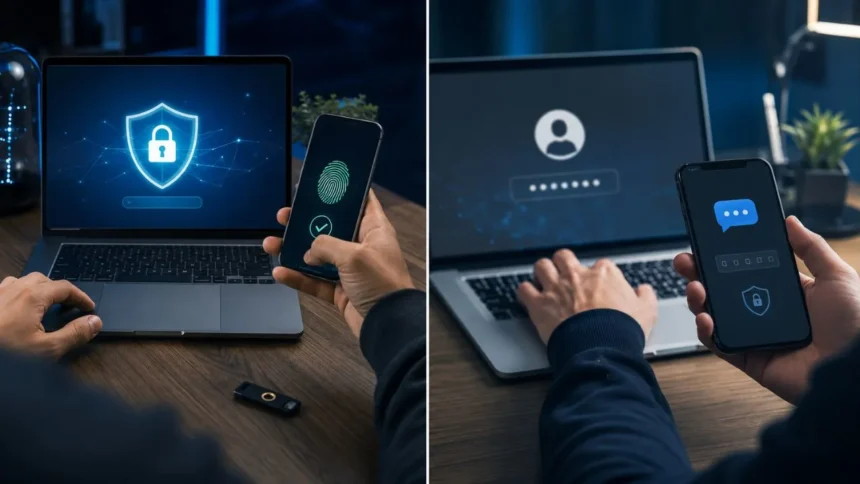
Two-factor authentication and two-step verification are commonly mentioned when people discuss online account security. Both approaches add another check after the first sign-in step, making it harder for an unauthorized person to access an account. However, the terms do not always describe exactly the same security process.
The main difference is based on the type of evidence used to confirm your identity. Two-factor authentication requires two different categories of authentication, such as a password and a security key. Two-step verification may simply require two actions, even when both actions rely on the same category of information.
This distinction can become confusing because technology companies often use the terms interchangeably. One platform may call its security feature “2-Step Verification,” while another describes a similar process as “2FA” or “multi-factor authentication.” The product name does not always reveal the technical strength of the sign-in method.
Understanding what is two factor vs two step helps you choose stronger protection for email, banking, social media, workplace systems, and cloud accounts. Instead of focusing only on the label, you should examine which authentication factors are required and whether attackers can easily steal or intercept them.
What Is Two-Step Verification?
Two-step verification is a sign-in process that requires users to complete two separate verification stages. The first stage is commonly a password, while the second may be a text message code, email code, authenticator app prompt, security question, passkey, or physical security key.
The defining feature is the number of steps rather than the categories of evidence being used. A service may therefore describe a process as two-step verification even when both steps depend on something the user knows. The process is longer than a password-only login, but it may not technically qualify as two-factor authentication.
For example, entering a password and then answering a security question involves two separate steps. However, both pieces of information belong to the knowledge category because they are things the user knows. This process provides another obstacle, but one attacker could potentially steal or guess both answers.
Two-step verification is still usually better than relying on a password alone. It can prevent access when an attacker knows only the password and does not possess the second credential. Its actual security value depends on how independent, private, and resistant to theft the second verification step is.
What Is Two-Factor Authentication?
Two-factor authentication, commonly shortened to 2FA, requires two different types of evidence before access is granted. These types are called authentication factors. A password combined with a physical security key is a clear example because the user provides something they know and something they possess.
The purpose of using different factor categories is to prevent one type of attack from defeating the entire login process. Someone who steals your password may still lack your phone, security key, or registered device. Similarly, possessing your phone may not provide access without the correct password or biometric verification.
Two-factor authentication is a specific form of multi-factor authentication. Two-factor authentication uses exactly two distinct factor types, while MFA may use two or more. In everyday conversations, however, people frequently use 2FA and MFA to describe the same additional account-security feature.
True 2FA does not simply mean entering two passwords or answering two knowledge-based questions. Both credentials belong to the same factor category, so they do not provide independent layers of protection. A genuine two-factor process combines evidence from two separate authentication categories.
The Main Difference Between Two-Factor and Two-Step
The simplest difference is that two-step verification counts actions, while two-factor authentication counts distinct factor types. Every 2FA login normally involves more than one verification step, but not every two-step process technically qualifies as 2FA. The evidence used during those steps determines the correct definition.
Suppose an account asks for a password and then a memorized security answer. The user completes two stages, so it is two-step verification. However, it is not strong two-factor authentication because both stages use knowledge-based information that could be exposed through phishing, guessing, or a data breach.
Now consider a login that requires a password followed by a code from an authenticator app on a registered phone. The password is something the user knows, while the phone and authenticator are something the user has. This process combines different factors and generally qualifies as two-factor authentication.
In practical terms, the difference matters because factor diversity makes account takeover more difficult. Two independent security barriers are stronger than two versions of the same barrier. When choosing a sign-in method, examine what each stage proves instead of trusting the product name displayed in the settings menu.
Understanding the Three Authentication Factors
The first authentication category is something you know. It includes passwords, personal identification numbers, passphrases, and answers to security questions. Knowledge factors are easy to use, but they can be guessed, shared, reused, recorded, exposed in breaches, or stolen through convincing phishing pages.
The second category is something you have. Examples include a registered phone, authenticator application, smart card, hardware security key, or another trusted device. Possession factors make an attack more difficult because the criminal must gain control of a physical or digitally registered item.
The third category is something you are. This factor includes biometric characteristics such as fingerprints, facial recognition, and iris patterns. Biometrics are frequently used to unlock phones, password managers, security keys, and passkeys, although their exact role in authentication depends on how the service and device implement them.
Location and behaviour may also influence modern risk-based authentication systems, but they are not always treated as traditional authentication factors. A service might examine your device, network, typing behaviour, or location before requesting another check. These signals usually support security decisions rather than replacing the main authentication factors.
Examples of Two-Step Verification
A password followed by a security question is a basic example of two-step verification. The user performs two actions, but both rely on knowledge. This method may stop an attacker who has only the password, although publicly available personal information can make security answers easier to guess.
A password followed by a code sent to an email address is another common process. It creates two stages, but its effectiveness depends on whether the email account is independently protected. If an attacker already controls the inbox, they may obtain both the reset messages and verification codes.
Some services ask users to enter a password and then confirm another memorized PIN. This is technically a two-step process, yet both credentials remain knowledge factors. It may provide additional protection against casual guessing without offering the same independence as a password combined with a separate device.
Companies may still call stronger methods two-step verification as part of their product branding. A service labelled “2-Step Verification” might support authenticator apps, security keys, passkeys, or device prompts. You must therefore review the available methods before deciding whether the feature provides true multi-factor protection.
Examples of Two-Factor Authentication
A password combined with a one-time code from an authenticator app is a widely used example of 2FA. The password represents something you know, while the registered phone or authenticator represents something you have. The temporary code normally changes after a short period.
A password followed by a physical security key is another two-factor authentication method. After entering the password, the user connects, taps, or wirelessly activates the registered key. This method can offer stronger phishing resistance because the security key checks that it is communicating with the correct website.
A bank card combined with a PIN demonstrates the same idea outside online accounts. The physical card is something the customer has, while the PIN is something they know. A thief usually needs both pieces before completing a protected action, although banking systems may apply additional risk controls.
A password followed by approval on a registered phone can also provide 2FA when properly implemented. The user receives a sign-in request and confirms it through the trusted device. Number matching and clear location details can make these prompts safer by reducing accidental or manipulated approvals.
Is Two-Factor Authentication Safer Than Two-Step Verification?
Two-factor authentication is generally stronger when two-step verification uses two credentials from the same category. Different factors provide independent barriers, meaning that one stolen item may not be enough to access the account. This is the central security advantage of true 2FA.
However, the label alone does not guarantee better security. A company may call its feature two-step verification while offering strong security keys or passkeys. Another service may advertise 2FA while relying on a method that attackers can intercept, redirect, or persuade the user to approve.
The quality of the chosen factors matters as much as the technical definition. A password combined with an SMS code is stronger than a password alone, but it may be exposed to SIM-swapping, phishing, mobile network weaknesses, or stolen-device access. Other possession-based methods may provide better protection.
The strongest practical choice is usually a phishing-resistant authentication method supported by the account. Passkeys and FIDO security keys are designed to work only with the genuine website or application. This makes them harder for fake login pages to capture and reuse than manually entered verification codes.
SMS Codes vs Authenticator Apps
SMS verification sends a temporary code to the phone number registered with the account. It is convenient because users do not need to install another application or purchase hardware. For many people, enabling SMS-based verification is a meaningful improvement over using only a reused or weak password.
The main weakness is that the phone number may be transferred or compromised. In a SIM-swapping attack, a criminal persuades or manipulates a mobile provider into moving the number to another SIM. The attacker may then receive verification messages intended for the legitimate account owner.
Authenticator applications normally generate temporary codes directly on a registered device. The codes do not depend on mobile network delivery, making them less vulnerable to phone-number takeover. They can still be stolen if the user types them into a convincing phishing website controlled by an attacker.
When both options are available, an authenticator app is often a stronger choice than SMS. Users should still protect the device with a screen lock and maintain secure recovery options. The best method remains one that combines strong security with a realistic setup the account owner can use consistently.
Push Notifications and Approval Fatigue
Push-based authentication sends a notification to a registered device when someone attempts to sign in. The user approves or rejects the request through an authentication application. This process is fast and eliminates the need to manually copy a temporary verification code into the login screen.
The risk appears when attackers repeatedly send approval requests after obtaining a password. A tired, distracted, or confused user may eventually approve one simply to stop the notifications. This technique is known as MFA fatigue, push fatigue, or authentication bombing.
Number matching can reduce this risk by displaying a number on the login screen that must be selected or entered on the trusted device. The user must actively connect the notification to the sign-in attempt instead of pressing a simple approval button without checking the request.
Never approve an unexpected authentication notification. Reject the request, change the affected password, review account activity, and report the incident when it involves a workplace account. Repeated prompts may indicate that someone already possesses the correct password and is attempting to complete the login.
Security Keys and Phishing-Resistant 2FA
A physical security key is a small device that securely confirms a login. Depending on its design, it may connect through USB or communicate through NFC or Bluetooth. The user registers the key with an account and activates it when the service requests additional identity verification.
Security keys based on FIDO standards are resistant to traditional credential phishing. The key verifies the website’s identity before completing authentication, so it should not respond correctly to a lookalike domain. Attackers cannot simply collect and replay a temporary code from a fake login page.
This method is particularly valuable for email accounts, administrators, executives, journalists, financial teams, and other people who face targeted attacks. It can also protect ordinary personal accounts when supported. Users should consider registering a backup key and storing it in a separate secure location.
The main challenges are availability, cost, compatibility, and recovery planning. A user could lose or damage the key, while some older services may not support it. Setting up more than one approved method can prevent lockout without leaving a weak recovery path that attackers can easily exploit.
Where Passkeys Fit Into the Comparison
Passkeys are a passwordless sign-in method based on public-key cryptography. Instead of typing a reusable password, users approve access through a registered device, password manager, fingerprint, face scan, or screen lock. The website stores a public key rather than a secret password that can be stolen.
A passkey is tied to the genuine website or application for which it was created. A fraudulent website cannot normally request the same passkey and use it to access the real service. This design makes passkeys resistant to many traditional phishing and credential-stuffing attacks.
Passkeys do not always fit neatly into the visible two-step model. A user may complete one simple action, such as scanning a fingerprint, while the device performs the cryptographic authentication behind the scenes. The exact factor classification depends on the passkey type, device protection, and service implementation.
For users, the important point is that fewer visible steps do not necessarily mean weaker security. A well-implemented passkey can provide stronger protection than a password followed by an SMS code. Security should be judged by resistance to theft, phishing, and account recovery attacks rather than screen count.
Common Threats Against Two-Step and Two-Factor Security
Phishing remains a major threat to verification methods that require users to manually enter codes. An attacker can create a fake login page, collect the password, and immediately request the current one-time code. The criminal then enters both credentials into the genuine website before the code expires.
SIM-swapping targets accounts that depend on text messages or phone calls. Once the criminal controls the victim’s number, verification codes and password-reset messages may be redirected. Strong mobile account PINs and less dependence on SMS can reduce exposure to this type of attack.
Malware can capture passwords, browser sessions, authentication codes, or information displayed on an infected device. In some cases, attackers steal an authenticated session after the user has successfully completed 2FA. Keeping devices updated and avoiding suspicious downloads therefore remains important even after enabling additional verification.
Account recovery can become the weakest part of an otherwise secure setup. Attackers may exploit support processes, recovery email accounts, backup codes, or poorly protected phone numbers. Every recovery option should receive the same level of attention as the main authentication method.
How to Choose the Best Method for Personal Accounts
Start by protecting your primary email account because it is commonly used to reset passwords for other services. Choose the strongest authentication method the provider supports, secure the recovery email, and review which devices are currently signed in. A compromised inbox can expose many connected accounts.
Passkeys or physical security keys are strong options where available because they reduce exposure to fake login pages. Authenticator apps are a useful alternative for services that do not support phishing-resistant methods. SMS verification remains better than password-only protection when stronger choices are unavailable.
Store backup codes in a secure place that is separate from the main device. Do not leave screenshots of recovery codes in an unprotected photo gallery or email them to yourself. A password manager, encrypted storage location, or physically secured copy may offer better protection.
Use unique passwords for any accounts that still require them. Additional verification cannot fully compensate for password reuse, unsafe recovery settings, or compromised devices. A strong security setup combines unique credentials, secure authentication, software updates, account monitoring, and cautious behaviour around unexpected login requests.
How Businesses Should Use MFA
Businesses should require multi-factor authentication for email, cloud services, remote access, financial systems, administrator accounts, and platforms containing sensitive customer data. Password-only access creates unnecessary risk because stolen credentials can be purchased, phished, guessed, reused, or extracted from compromised devices.
Not every MFA method provides the same protection. Organizations should prioritise phishing-resistant options for employees with privileged access or greater exposure to targeted attacks. Security keys, passkeys, certificate-based authentication, and carefully configured device-based methods can provide stronger protection than reusable passwords and SMS codes.
Companies should also establish clear enrolment and recovery procedures. Attackers may target technical support teams by pretending to be employees who lost a device. Identity checks, manager approval, help-desk training, and detailed audit records can prevent fraudulent resets from bypassing the main authentication controls.
Authentication should be combined with conditional access, device security, monitoring, and limited permissions. MFA reduces account-takeover risk, but it does not make every login automatically safe. Stolen sessions, malicious applications, excessive access rights, and compromised endpoints can still create serious security incidents.
Common Setup Mistakes to Avoid
The first mistake is enabling a strong authentication method while leaving a weak fallback option active. An attacker may ignore the security key and target an easily manipulated recovery phone number instead. Review every sign-in, password-reset, and recovery method connected to the account.
Another mistake is storing passwords and backup codes together. If both are saved in the same unprotected document, anyone who obtains that file may bypass the entire verification process. Separate the primary credentials from emergency recovery information whenever practical.
Users also approve login prompts without checking the device, time, location, or service involved. Every unexpected prompt should be treated as a possible attack. Rejecting the request and investigating it is safer than assuming it was caused by a harmless technical error.
Finally, people may activate two-factor authentication without testing account recovery. A lost phone, replaced device, or deleted authenticator app can create a serious lockout. Register secure backup methods, confirm they work, and update them whenever your phone number, device, or email address changes.
Two-Factor vs Two-Step: Which One Should You Use?
Choose true two-factor or multi-factor authentication whenever the service makes it available. Combining different factor types generally creates stronger protection than completing two knowledge-based steps. A stolen password should not be enough to defeat the second security barrier.
Within 2FA options, prefer methods that resist phishing. Passkeys and FIDO security keys are strong choices for supported accounts, particularly email, financial, administrator, and business services. Authenticator apps are useful when phishing-resistant methods are not available or practical.
SMS-based two-step verification should not be dismissed when the only alternative is password-only access. It can stop many basic account-takeover attempts, although users should understand its limitations. Moving to a stronger method later can improve protection without abandoning the immediate benefit of another verification step.
The right method must also be manageable. A security system that causes repeated lockouts may encourage people to create unsafe workarounds. Strong authentication should therefore include clear instructions, backup options, accessible recovery procedures, and methods suited to the user’s devices and level of risk.
Final Thoughts
The difference between two-factor and two-step verification comes down to factors and actions. Two-step verification requires two stages, while true two-factor authentication requires evidence from two separate factor categories. That distinction helps explain why some methods provide stronger protection than others.
In real-world product settings, the terms are frequently used interchangeably. A feature called two-step verification may still provide genuine 2FA through an authenticator app or security key. Always examine the available verification methods instead of deciding based only on the feature’s name.
For stronger account protection, prioritise phishing-resistant passkeys or security keys when they are supported. Authenticator applications provide another valuable option, while SMS codes can still improve security when no stronger method is available. Password-only access should be avoided for important accounts.
Effective authentication also depends on recovery settings, device security, password habits, and user awareness. No single feature removes every cyber risk. Combining strong verification with safe recovery procedures and careful responses to login prompts creates a more dependable account-security strategy.
Frequently Asked Questions
Is two-step verification the same as two-factor authentication?
Not always. Two-step verification requires two actions, while 2FA requires two different authentication factor types. Companies may still use the terms interchangeably in their account settings.
Is a password and security question considered 2FA?
No. Both a password and a security answer are knowledge factors, meaning they are things you know. They create two steps but do not provide true factor diversity.
Is SMS verification considered two-factor authentication?
A password plus an SMS code is generally treated as 2FA because it combines knowledge with possession of a phone number or device. However, it is weaker than phishing-resistant options.
Are authenticator apps safer than text messages?
Authenticator apps are usually safer because their codes do not depend on mobile network delivery and are less exposed to SIM-swapping. Phishing websites can still steal manually entered codes.
Are passkeys better than two-step verification?
Passkeys can be safer than many traditional two-step methods because they resist phishing and do not expose reusable passwords. Their exact role depends on how each account and device implements them.
